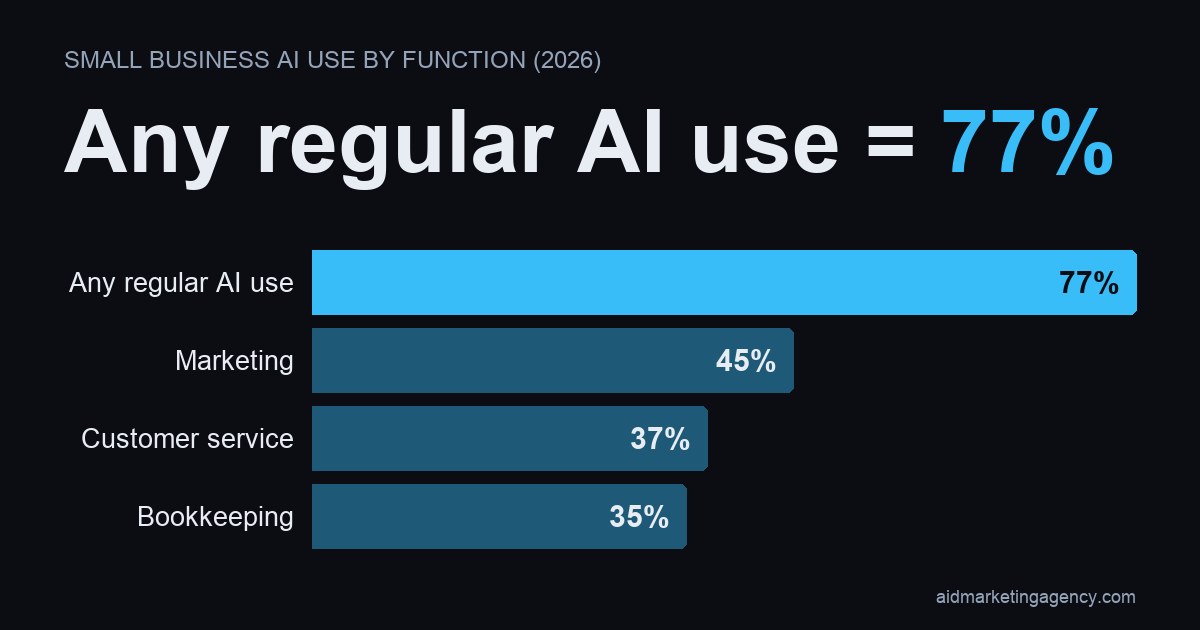
Charlotte small businesses aren't waiting to add headcount to solve their staffing gaps. They're turning to AI to cover after-hours reception, marketing, bookkeeping, and lead follow-up instead. Nationally, 77% of small and midsize businesses report using AI regularly as of January 2026, with marketing (45%), customer service (37%), and bookkeeping (35%) as the top three applications (Charlotte Observer, 2026). Below are 7 practical, low-lift ways local contractors and service businesses are putting AI to work today, plus a simple checklist to get started this week.
Why Charlotte Small Businesses Are Turning to AI Instead of New Hires
Hiring is slow, expensive, and risky when the workload is uneven. A contractor doesn't need a full-time office manager to answer three after-hours calls a week. A two-person shop doesn't need a marketing hire to post on Google three times a month.
That gap is exactly where AI has landed. Coverage of the 2026 AI Impact Report puts regular AI use at 77% among small and midsize businesses nationally, and the top three uses (marketing, customer service, and bookkeeping) are the same three jobs most small Charlotte businesses have been quietly outsourcing to whoever has a spare hour (Charlotte Observer, 2026). None of that requires a new hire. It requires turning something on. For the bigger national picture on this shift, see our guide to how AI is changing small business operations.
1. Handling Routine Customer Questions After Hours
Most service calls that come in after 6pm don't need a licensed technician on the line. They need someone, or something, to confirm the service area, quote a rough price range, and get a callback booked.
Website chat widgets and simple AI answering tools now handle exactly that. A homeowner asks if you service their zip code, what a service call runs, or whether you're open Saturdays, and the AI answers instantly instead of the call going to voicemail. In our experience helping Charlotte contractors set this up, the businesses that turn on automatic after-hours response stop losing the easy, obvious jobs to whichever competitor happened to pick up. We wrote more on this specific setup in our guide to missed-call and after-hours response for Charlotte contractors.
2. Speeding Up Lead Response and Follow-Up
Older research on lead response, the Lead Response Management Study tied to MIT and Velocify, found that contacting a web lead within 5 minutes made a business dramatically more likely to actually reach and qualify that lead compared to waiting even 30 minutes (Velocify, 2011). That study is old enough that we're hedging it here rather than treating it as a current benchmark, but the underlying lesson hasn't changed: speed wins jobs.
AI-driven text-back and lead-routing tools are how a two-truck contractor competes with a five-truck contractor on speed. A missed call gets an instant text. A web form gets an instant reply. Nobody has to sit by the phone for it to happen. We go deeper on this in our piece on speed to lead for Charlotte service businesses.
3. Writing Marketing Copy Without Hiring a Marketer
Marketing is the single most common use of AI among small and midsize businesses right now, at 45% (Charlotte Observer, 2026). That tracks with what we see in Charlotte: contractors using AI to draft Google Business Profile posts, service-area landing pages, review-request messages, and email promos, not because they've hired a marketer, but because a rough draft in 5 minutes beats a blank page for 3 weeks.
The copy still needs a human read before it goes out (customers can tell when nobody proofread it), but the first draft doesn't have to come from a person anymore. Our AI marketing checklist for Charlotte contractors walks through exactly where to start.
4. Managing Customer-Service and Intake Workflows
37% of businesses using AI put it to work on customer service (Charlotte Observer, 2026). For a local service business, that usually shows up as a triage layer: sorting incoming requests by urgency, summarizing what a customer actually needs before anyone calls them back, or routing a plumbing emergency ahead of a routine estimate request.
None of this replaces a dispatcher who knows the crew and the schedule. It just means that dispatcher isn't reading every single intake form cold.
5. Cleaning Up Bookkeeping and Admin Work
35% of businesses using AI use it for bookkeeping (Charlotte Observer, 2026), and this is often the fastest win for a small operation. AI tools can categorize expenses, draft invoice descriptions, and summarize receipts before anything lands on a bookkeeper's desk or a CPA's spreadsheet.
That's not a bookkeeper replacement. It's a way to hand your bookkeeper cleaner, faster inputs instead of a shoebox of receipts every quarter.
6. Producing Social Media Content and Post Scheduling
Tools that suggest posting times, recommend hashtags, and flag which past posts actually performed are showing up across small business marketing stacks, according to the same 2026 coverage (Charlotte Observer, 2026). For a Charlotte contractor, that's the difference between "we should really post more" and an actual before-and-after photo, review shoutout, or seasonal reminder going out on a schedule.
You still need the photo. AI just handles the caption, the timing, and the nagging feeling that you're behind on content.
7. Turning Meetings and Site Visits Into Estimates and Notes
Transcription tools like Otter.ai and Fireflies can record a call or a walkthrough and pull out the action items automatically, according to the same reporting (Charlotte Observer, 2026). For a contractor running back-to-back site visits, that means the estimate follow-up and the customer notes don't depend on remembering everything correctly at 6pm after the fifth job of the day.
Charlotte Contractor AI Starter Checklist
Here's a simple way to map each use case above to one first action, so you can start this week without needing technical help or a new hire.
| Use Case | First Action | Time to Implement |
|---|---|---|
| After-hours questions | Turn on a website chat widget or after-hours text-back line | Same day |
| Lead response speed | Set up missed-call text-back on your business line | Under an hour |
| Marketing copy | Draft one Google Business Profile post with an AI writing tool | 15 minutes |
| Customer-service intake | Add an AI intake form that summarizes requests before they hit your inbox | 1 to 2 hours |
| Bookkeeping | Connect an AI expense-categorization tool to your business card feed | 30 minutes |
| Social content | Use an AI tool to draft 4 weeks of captions from photos you already have | 1 hour |
| Meeting and estimate notes | Turn on a transcription tool for your next site visit call | 5 minutes setup |
How to Start Using AI in Your Charlotte Business This Week
Pick one row from the table above. Just one. Trying to fix all 7 at once is how these projects die on a to-do list.
Start with whichever gap is costing you the most right now. If you're losing after-hours calls, start there. If quotes take you 3 days to send, start with lead response. Small, working, and boring beats big and unfinished every time.
If you'd rather have someone build these systems for you instead of piecing them together on a Saturday afternoon, that's the kind of work we do for contractors day in and day out. See how we set this up for Charlotte service businesses.
Final Thoughts: Small Steps, No New Hires Required
Charlotte's small businesses aren't chasing AI because it's trendy. They're chasing it because the after-hours call, the slow follow-up, and the invoice nobody categorized are real costs, and AI happens to be a cheap, fast way to close those gaps without adding a salary. Start with one tool, get it working, then move to the next row on the checklist.